
Cron Expression Generator — Build Cron Schedules Visually Free
Cron Without the Syntax Memorization
Cron expressions are compact but counterintuitive. 0 2 * * 1 means "2am every Monday" — but the field order, wildcard rules, and step syntax (*/15) are easy to forget if you don't write them daily. Getting it wrong means a job either never runs or runs far too often.
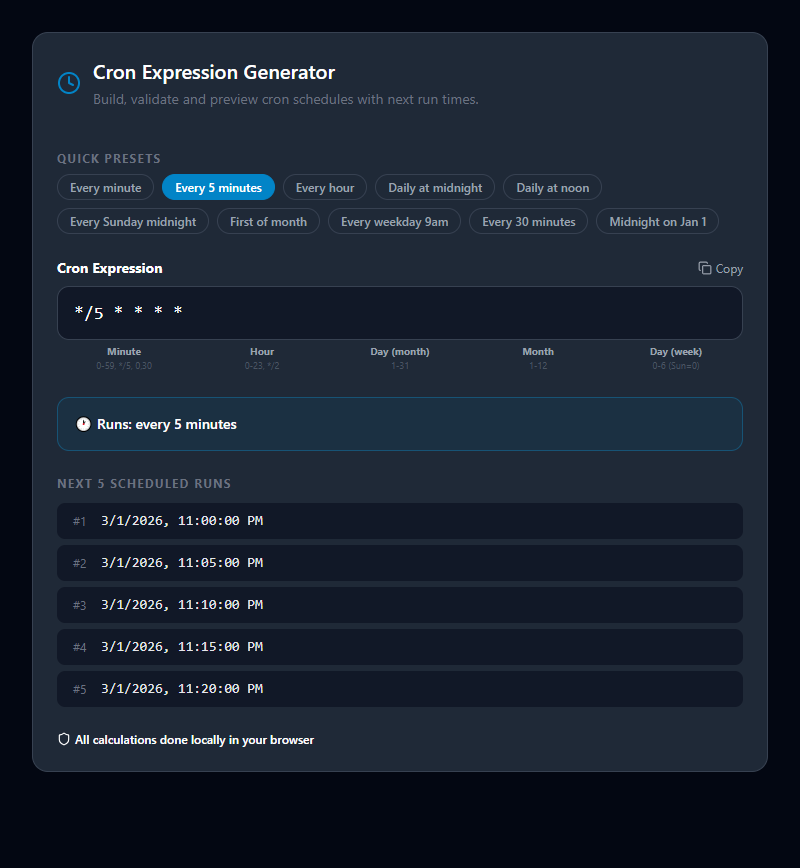
This tool builds cron expressions visually. Select a schedule from common patterns (hourly, daily, weekly, monthly) or configure each field individually. The expression generates as you select. The next 5 run times preview instantly so you can confirm the schedule is exactly what you intended.
Cron Expression Format
A standard cron expression has 5 fields:
┌───── Minute (0–59)
│ ┌───── Hour (0–23)
│ │ ┌───── Day of Month (1–31)
│ │ │ ┌───── Month (1–12 or JAN–DEC)
│ │ │ │ ┌───── Day of Week (0–7, where 0 and 7 are Sunday; or SUN–SAT)
│ │ │ │ │
* * * * *
Some systems (AWS EventBridge, Spring, Quartz) use 6-field cron with a seconds field at the start, or a year field at the end. The generator clearly marks which fields apply.
Field Value Reference
| Symbol | Meaning | Example |
|---|---|---|
* | Every value | * in minute = every minute |
, | Specific values | 1,15 = 1st and 15th |
- | Range | 9-17 = 9 through 17 |
/ | Step | */15 = every 15 units; 0/30 = at 0, 30 |
L | Last | L in day = last day of month |
? | No specific value | Used in day-of-month or day-of-week when the other is set |
W | Nearest weekday | 15W = weekday nearest the 15th |
# | Nth weekday | 2#1 = first Monday of the month |
Common Cron Expressions
| Schedule | Expression | Description |
|---|---|---|
| Every minute | * * * * * | Runs every 60 seconds |
| Every 5 minutes | */5 * * * * | Runs at :00, :05, :10... |
| Every 15 minutes | */15 * * * * | Runs 4 times per hour |
| Every hour | 0 * * * * | At the top of every hour |
| Daily at midnight | 0 0 * * * | Every day at 00:00 |
| Daily at 2am | 0 2 * * * | Every day at 02:00 |
| Every Monday at 9am | 0 9 * * 1 | Weekly on Mondays |
| 1st of every month | 0 0 1 * * | Monthly, midnight |
| 1st Jan at midnight | 0 0 1 1 * | Annually |
| Weekdays at 8am | 0 8 * * 1-5 | Mon–Fri only |
| Twice daily | 0 6,18 * * * | At 6am and 6pm |
Practical Scheduling Scenarios
Database backups: 0 2 * * * — daily at 2am, off-peak hours when database load is minimal.
Report generation: 0 6 * * 1 — Monday mornings at 6am so reports are ready when the team arrives.
Cache clearing: */30 * * * * — every 30 minutes to keep data reasonably fresh without constant overhead.
SSL certificate renewal check: 0 */12 * * * — twice daily. Let's Encrypt and most CA tools check this way.
Payroll processing: 0 0 25 * * — 25th of every month, adjust for weekends separately.
Sending email digests: 0 9 * * 1-5 — weekday mornings only, avoiding weekend emails.
System-Specific Differences
| Platform | Format | Notes |
|---|---|---|
| Linux crontab | 5-field | Standard * * * * * |
| AWS EventBridge | 6-field | Adds year field: cron(0 2 * * ? *) |
| Spring / Quartz | 6 or 7-field | Adds seconds field at start |
| GitHub Actions | 5-field | Standard, uses UTC timezone |
| Kubernetes CronJob | 5-field | UTC timezone by default |
Always verify the format your specific system expects — a 5-field expression in a 6-field context will either fail or schedule incorrectly.
Related Developer Tools
- UUID Generator — Generate unique job IDs for scheduled tasks
- JSON Formatter — Format JSON configuration for cron job definitions
- Regex Tester — Test patterns for log parsing in scheduled jobs
- SQL Formatter — Format scheduled database maintenance queries
Recommended schema: SoftwareApplication + FAQPage
Related Search Queries
To help users find exactly what they are looking for, this tool is also optimized for searches like: cron expression generator, cron evaluator.