
Password Generator — Create Strong Random Passwords Free Online
The Difference Between a Guessable and an Uncrackable Password
"Password123" gets cracked in under a second. "Fluffy2019!" in a dictionary attack — seconds. Your dog's name with your birth year — seconds. Any of those methods the average person uses to "make it memorable" are exactly what automated password-cracking tools are optimised to try first.
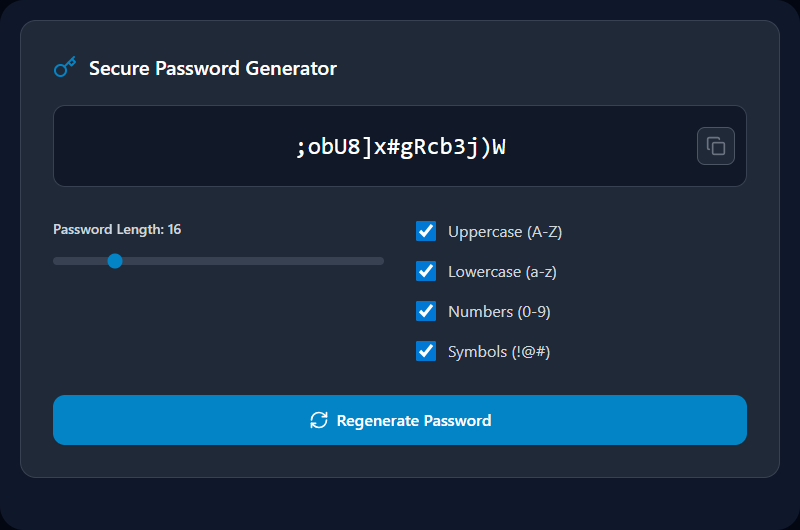
A cryptographically random password — one where each character is independently chosen from a character pool with no pattern — gives attackers nothing to work from. This generator creates exactly that. Every click produces a new password chosen with your browser's cryptographic random number generator. Your password never leaves your device.
How the Generator Works Under the Hood
Cryptographic randomness — not Math.random()
The Web Crypto API's crypto.getRandomValues() is used to generate each character index:
const array = new Uint32Array(length);
crypto.getRandomValues(array);
const password = Array.from(array, n => charset[n % charset.length]).join('');
This is a CSPRNG (Cryptographically Secure Pseudo-Random Number Generator). It draws from your operating system's entropy pool — hardware noise, timing jitter, interrupt randomness — not a predictable mathematical sequence. Math.random() is explicitly not used because it is deterministic and can be predicted if the seed is known.
Entropy — the real measure of password strength
Entropy (bits) = log₂(charset_size) × password_length
| Character Set | Size | Bits per Character | 16-char Entropy |
|---|---|---|---|
| Lowercase only | 26 | 4.70 | 75.2 bits |
| Lower + Upper | 52 | 5.70 | 91.2 bits |
| Lower + Upper + Digits | 62 | 5.95 | 95.2 bits |
| All (+ 32 symbols) | 94 | 6.55 | 104.8 bits |
At 10 billion guesses per second (world-class GPU cluster), 104 bits of entropy would take approximately 3 × 10¹³ years to brute-force. By comparison, an 8-character all-alpha password has ~38 bits — crackable in minutes with modern hardware.
Recommended Settings by Use Case
| Use Case | Recommended Length | Character Set | Notes |
|---|---|---|---|
| Standard web accounts | 16–20 chars | All types | Store in password manager |
| Master password (vault) | 20–25 chars | All types | Write down and store securely offline |
| Wi-Fi network (WPA2/3) | 16–20 chars | No ambiguous chars | You may need to type this manually |
| PIN / numeric codes | 8–12 digits | Numbers only | For systems requiring numeric only |
| API keys / secrets | 32+ chars | All types | Use for internal app credentials |
| Service accounts | 24+ chars | All types | Rotate every 90 days |
Real-World Use Cases
New account registrations: Generate a unique password for every new account you create — never reuse passwords across websites. If one service gets breached, unique passwords contain the damage to that single account.
Password manager setup: Use this tool to generate the master password for Bitwarden, 1Password, or KeePass. Make it 20+ characters and write it down in a physically secure location — this single password protects all others.
System administration: Generate secure temporary credentials for new user accounts, database connection strings, API keys, server access passwords, and service accounts.
Replacing weak existing passwords: After a data breach notification, immediately generate and set a new unique password for the affected service — and any other service where you've reused that password.
Best Practices
Always use a password manager. A generated password like #nQ7!kRv@2xLmJ8p is impossible to memorise — it's designed to be. Use Bitwarden (free, open-source), 1Password, or KeePass to store it. Copy-paste into the field, never type from memory.
Never send passwords via SMS or plain email. Both are unencrypted. If you must share a credential, use an end-to-end encrypted messenger (Signal, WhatsApp) or a purpose-built secret sharing tool with one-time links.
Enable two-factor authentication (2FA) wherever available. Even a perfect password can be phished. 2FA with an authenticator app (Google Authenticator, Authy) or a hardware key (YubiKey) makes account takeover exponentially harder.
Rotate high-value passwords periodically. Service accounts, admin credentials, and master passwords should be rotated every 90–180 days, or immediately after any security incident.
Limitations & Common Mistakes
"This looks complex enough" is not a substitute for length. Adding one symbol to an 8-character password improves entropy marginally. Adding 8 more characters improves it massively. Length matters more than complexity.
Some services have broken password policies. Maximum 12 characters. No symbols allowed. Specific symbol whitelists. These constraints reduce entropy — use the maximum length the service allows and generate fresh until you get one that fits the policy.
Avoid the temptation to modify generated passwords. "I'll change the 3 to 'E' so I'll remember it" — this defeats the randomness and is precisely the kind of predictable substitution pattern cracking tools are trained on. Let the manager remember.
Related Tools
- Advanced Password Generator — Exclude ambiguous characters (O, 0, I, l) for credentials you need to type manually
- Password Strength Tester — Check entropy and crack-time for any password
- UUID Generator — Generate strong random identifiers for tokens and API keys
- SHA Hash Generator — Hash any text with SHA-256/512 for verification
- File Hash Checker — Verify the integrity of downloaded files
Recommended schema: SoftwareApplication + FAQPage