
Regex Tester — Test Regular Expressions Online, Real-Time
Write It Once, Get It Right
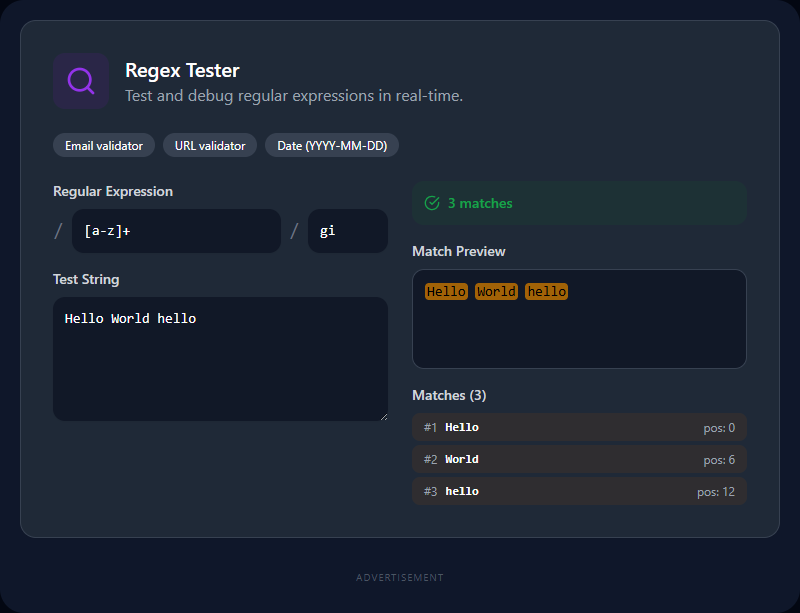
Regular expressions are compact but unforgiving. A single misplaced character changes what matches. Testing a regex by running a script, checking the output, adjusting, and running again wastes minutes per iteration. This tester closes that loop: type your pattern, paste your test string, and every match highlights instantly as you type.
Regex Syntax Quick Reference
| Pattern | Matches |
|---|---|
. | Any character except newline |
\d | Digit (0–9) |
\w | Word character (a–z, A–Z, 0–9, _) |
\s | Whitespace (space, tab, newline) |
^ | Start of string (or line with m flag) |
$ | End of string (or line with m flag) |
* | Zero or more of the preceding |
+ | One or more of the preceding |
? | Zero or one (also: lazy quantifier) |
{n,m} | Between n and m repetitions |
[abc] | Any of a, b, or c |
[^abc] | Not a, b, or c |
(...) | Capturing group |
(?:...) | Non-capturing group |
(?=...) | Positive lookahead |
| ` | ` |
Flags
| Flag | Effect |
|---|---|
g | Global — find all matches, not just the first |
i | Case-insensitive matching |
m | Multiline — ^ and $ match line starts/ends |
s | Dot-all — . also matches newlines |
u | Unicode mode — full Unicode character support |
Practical Regex Patterns You Can Use Now
Email validation:
^[a-zA-Z0-9._%+\-]+@[a-zA-Z0-9.\-]+\.[a-zA-Z]{2,}$
Phone number (international format):
^\+?[1-9]\d{6,14}$
Date (YYYY-MM-DD):
^\d{4}-(0[1-9]|1[0-2])-(0[1-9]|[12]\d|3[01])$
IPv4 address:
^(\d{1,3}\.){3}\d{1,3}$
HTTP/HTTPS URL:
^https?:\/\/[^\s/$.?#].[^\s]*$
Extract JSON string values:
"([^"]+)":\s*"([^"]+)"
Paste these into the pattern field and test them against your own strings to see exactly which parts match.
Real-World Uses
Form validation: Test email, phone, and postal code patterns before embedding them in your validation logic. Try both valid and invalid inputs to confirm both-direction correctness.
Log parsing: Extract timestamps, IP addresses, HTTP status codes, and request paths from server log lines without writing full parser code.
Code search and replace: Many editors support regex in find/replace. Build and test complex replacement patterns — with capture group references — before applying to source code.
Data extraction: Pull specific fields from structured text. A (\d{4}-\d{2}-\d{2}) pattern in a capturing group extracts the date string from any surrounding text.
Input sanitization: Test what patterns match user input that should be blocked — usernames with invalid characters, inputs containing script tags, or content exceeding length limits.
Common Pitfalls
Greedy vs. lazy matching. By default, .* is greedy — it matches as much text as possible. .*? is lazy — it stops at the first opportunity. When matching between delimiters like <b>text</b>, use .+? not .+ to avoid consuming both the opening and closing tags.
Forgetting the global flag. Without g, the tester only highlights the first match. Add g to see all matches in the test string.
Not anchoring validation patterns. \d+ matches any substring of digits — it'll match the numbers inside abc123def. For full-string validation, anchor with ^\d+$.
Catastrophic backtracking. Certain patterns ((a+)+ applied to aaaaaaa!) cause exponential matching attempts — freezing the browser or server. Avoid overly nested quantifiers in patterns that process untrusted input. Test with adversarial inputs.
JavaScript regex differs from PCRE. Patterns from Python, PHP, or Perl tutorials may use features not supported in JavaScript — possessive quantifiers, certain lookbehind constructs, or some Unicode properties. Always test in the environment you'll deploy in.
Related Developer Tools
- JSON Formatter — Test regex data extraction on JSON strings
- SQL Formatter — Format SQL queries alongside regex input validation
- Cron Expression Generator — Another pattern syntax with a visual builder
- URL Encoder / Decoder — Handle special characters in regex test strings
Recommended schema: SoftwareApplication + FAQPage